 -12%
-17% 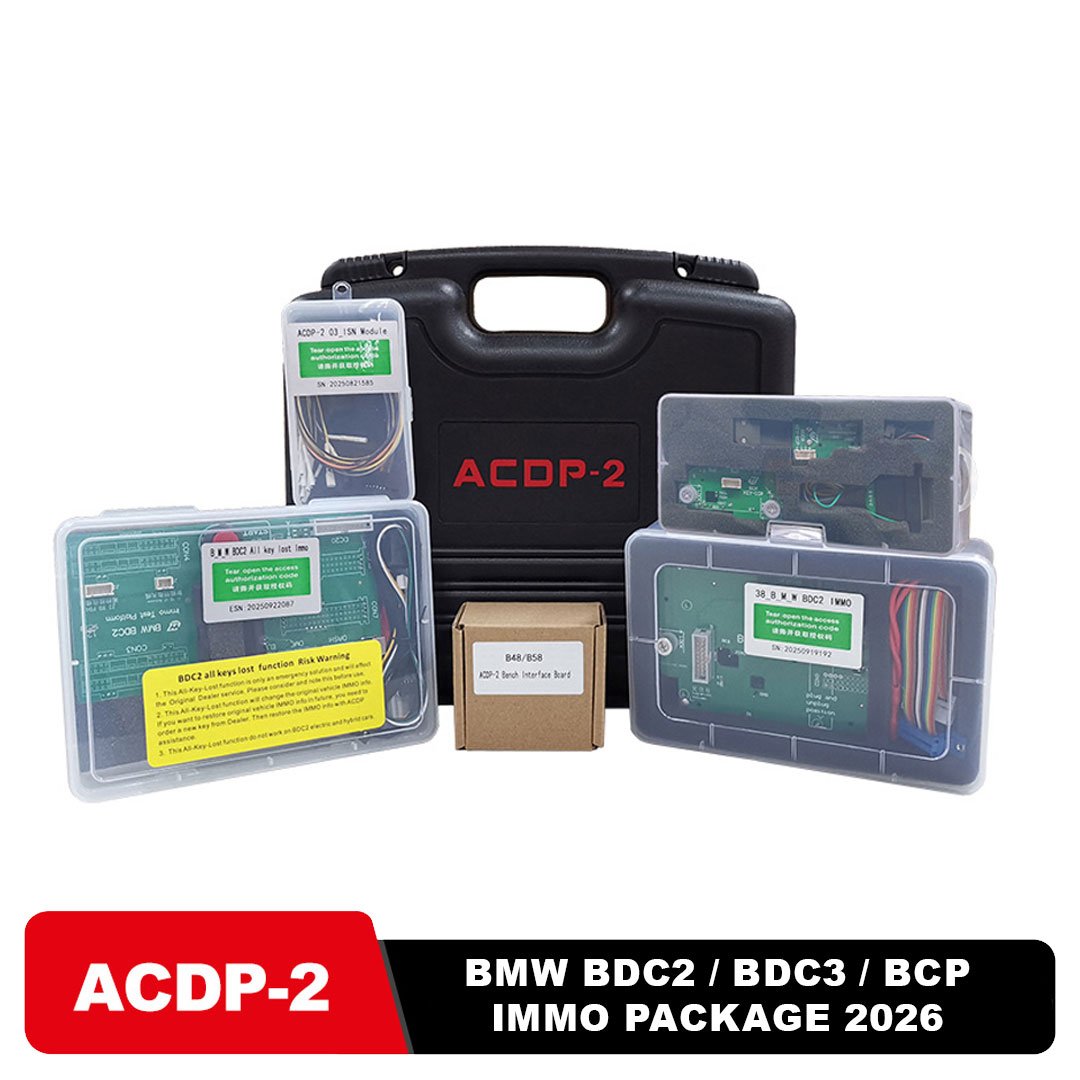
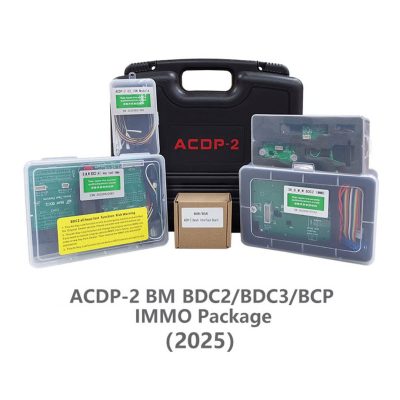
Yanhua ACDP2 BMW BDC2 / BDC3 / BCP IMMO Package 2026
Original price was: €1,109.40.€920.20Current price is: €920.20.
You save €189.20 - Worldwide shippingTracked delivery on every order
- Secure paymentCard, PayPal and bank transfer
- Need help?Ask our technical team
Category:
Key Programming Tools
Yanhua ACDP2 BMW BDC2 / BDC3 / BCP IMMO Package 2026
Yanhua ACDP2 BMW BDC2 / BDC3 / BCP IMMO Package 2026 Product Description:
New Bundle Yanhua ACDP2 BMW BDC2 / BDC3 / BCP IMMO Package 2026 For BMW BDC2 Add Key, All Key Lost, Mileage Reset and BMW BDC3 BCP LCD Key Copy
Key Programming Tools From YanhuaACDP
Product Number: TUFO619
Product Weight: 5200g
Yanhua ACDP2 BMW BDC2 / BDC3 / BCP IMMO Package 2026 Specs:
Manufacturer: YanhuaACDP
Condition: New
MoreDetails:
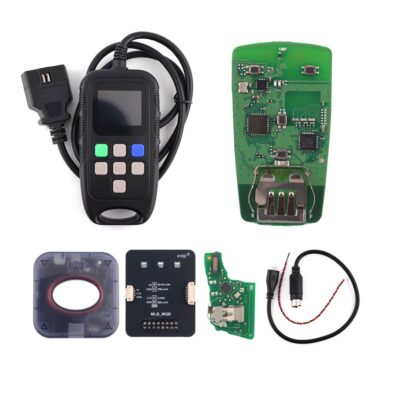
The package contains:
- Yanhua Mini ACDP 2 Key Programming Master Basic Module
- Yanhua ACDP 2 Module 3 for DME ISN Read and Write Without Soldering
- Yanhua ACDP BMW G Series Set Module 38
- Yanhua ACDP BMW BDC2 Keys Learning Bench Platform works with Module 38
- Yanhua ACDP – Read / Write Locked B48/58 DEM Data License
- Yanhua ACDP / ACDP 2 BMW BDC3 / BCP Interface Board
- Yanhua ACDP BMW BDC2 / BDC3 / BCP / LCD Key (Encrypted Chip) Copy Interface Board Kit
Functions:
1: Supports BMW BDC2 add keys and all keys lost.
2: Supports BMW BDC3 keys copy.
3: Supports BMW BCP keys copy.
4: Supports BMW B48/B58 DME ISN read.
5: Supports BMW BDC2 module refresh and Copy data replacement.
Notice:
1. Above items are must-to-have tools for BMW G-Chassis BDC2 all key lost programming. For ACDP old user, you just need buy the one which you do not have, for new user, need buy all of them.
2. If you have other device which can read and write BMW DME ISN, you do not need the ACDP Module 3+B48 Interface Board)
3. This package is for BMW BDC2, BDC3, BCP key programming. If you want to do BMW BDC2 mileage correction,
4. Flexible to add other ACDP modules.
5. If you need BMW G blank keys, please contact us to purchase.
ACDP-2 Basic Module Features:
Yanhua Mini ACDP-2 supports 93/24/25/35/95 Series EEPROM in circuitprogramming(ICP) and on adapter board programming(OBP). This module is a necessary basic configuration for other modules.
Extended Functions: By expanding more adapters to achieve various functionsauch as ECU programming key programming/matching, ECU refresh.
The current adapters include: BMW CAS, BMW FEM/BDC, BMW DME, Meter/Instrument, BMW Key refresh, BMW FRM(Footwell), BMW EGS(Gearbox), Fujitsu CPU, VW MQB, Jaguar Land/Rover KVM, Porsche BCM, Volvo, etc.
Mini ACDP-2 Advantages:
1. No need removing chip, No need soldering, No need cutting line, No needlifting the pin.
2. USB direct connection, plug and play. wifi connection, wireless free.
3. Pin intelligent detection, Data reading and writing is safe and reliable.
ACDP BMW BDC2 IMMO Module 38 Function:
Supports adding key for all versions of BMW BDC2.
Enable keys, disable keys, reset starter motor, headlight height match
BMW BDC2 all key lost
BMW BDC2 Mileage Correction
BMW BDC2 Module Refresh
BMW BDC2 Module Copy Replacement
Supports original key and aftermarket key. Both 315Mhz (US) and 433MHz (EU).
Just need to insert the interface board to the BDC2 module directly.
No annual fees or per-use charges—one-time solution with zero hidden costs.
BMW BDC2 Key Learning Test Platform:
All‑Key‑Lost License Update: Includes free software license updates for BMW BDC2 key learning (Module 38).
Module‑Free Bench Learning: Program new keys on the bench without reinstalling the BDC2 module in the vehicle.
Emergency Function Testing: Enables ignition-on and emergency start testing to verify successful key learning.
Remote & Keyless Testing: Supports connection to smart antennas, IR boxes, and keyless systems for remote-only validation.
Cluster & DME Integration: Expandable to test integration with instrument cluster and engine control units (DME).
Plug‑and‑Play Interface Board: Dedicated board replaces cable harnesses—efficient, safe, and straightforward.
Fully Compatible: Works with any ACDP-enabled device that supports Module 38.
ACDP BMW ISN Module 3:
Support Reading/writing BMW DME ISN(Necessary when all-key-lost).
1. Support OBD/CAN reading BMWE chassis MSV80/MSV801, MSD80/MSD802, MSD81/MSD812, MSD851/MSD852, N62_TUE/N62_TUE2, MEV9N46/MEV9N46L, N46(MV1746), MSV70, MSS60, BMW R chassis
N12(MEV172), N14(MED172), N16(MEV1722D), N18(MEVD1722), N18(MEVD1727) and other DME ISN.
2. Support bench method to quickly read the DME ISN such as BMWN20/N55/B38/B48(need to purchase interface board).
3. Support OBD mode to read some versions of the B48 and MSV90 enginecomputer ISN(need to purchase authorization).
ACDP BMW B48/B58 Interface Board
1. Support all F/G chassis versions and all B48/B58 DME which chip modle is SPC5777/TC298TP
2. No programming is required and the ISN is read in seconds
3. The special interface board connection method replaces the traditional plugging wire method, simple and efficient, safe and reliable
Yanhua ACDP BMW BDC3 BCP Interface Board
1. Supports use original brand new keys copying 2020-2024 BMW BDC3 keys(G chassis BDC3 keys manufactured in Hungary).
2. Supports use original brand new keys copying BMW U chassis BCP keys(with and without UWB functionality).
How to Enter the All Key Lost Menu In ACDP APP?
- BMW-> FEM/BDC-> IMMO/Mileage-> BDC2 ICP+ OBD (F/G Chassis)-> Add Key (All key lost)
For BMW G Series BDC2 All key lost you will need
- 1. ACDP 1 or ACDP 2 host
- 2. Module 38
- 3. Module 3 ISN module + B48 interface board
- 4. BMW key learning platform with BDC2 AKL license (work together with module38)
Risk warning:
1. This All-Key-Lost function is only an emergency solution and will affect the BMW Dealer service. Please consider and note this before use.
2. This All-Key-Lost function will change the original vehicle IMMO info. If you want to restore original vehicle IMMO info in future, you need to order a new key from BMW Dealer. Then restore the IMMO info with ACDP (check video column).
3. This All-Key-Lost function does not work on BDC2 electric and hybrid cars.
Yanhua ACDP BMW BDC2 All Keys Lost Procedure:
How to Enter the All Key Lost Menu In ACDP APP?
- BMW- FEM/BDC – IMMO/Mileage – BDC2 ICP+ OBD (F/G Chassis) – Add Key (All key lost)
How to Do BMW BDC2 All Key Lost?
Step 1: Backup coding data
- Use Yanhua ACDP Module 3 and B48 Interface Board to backup EEPROM data
Step 2: Backup FAFP data
Step 3: Write IMMO data
Step 4: Write coding data
Step 5: Made dealer key
- After making the dealer key, turn on the ignition to do key match
Step 6: Write DME ISN
- Verify the key can start the car normally, then go to next step
Step 7: Reset EGS EWS(turn on ignition, but not start the car)
After finishing these steps, start the engine – both the key and vehicle should now function properly.
| Manufacturer | YanhuaACDP |
|---|---|
| Condition | New |
Orders are shipped worldwide with tracking. Processing usually takes 1-3 business days after payment.
If an item arrives damaged or does not match your order, contact us within 14 days. See our returns policy for details.